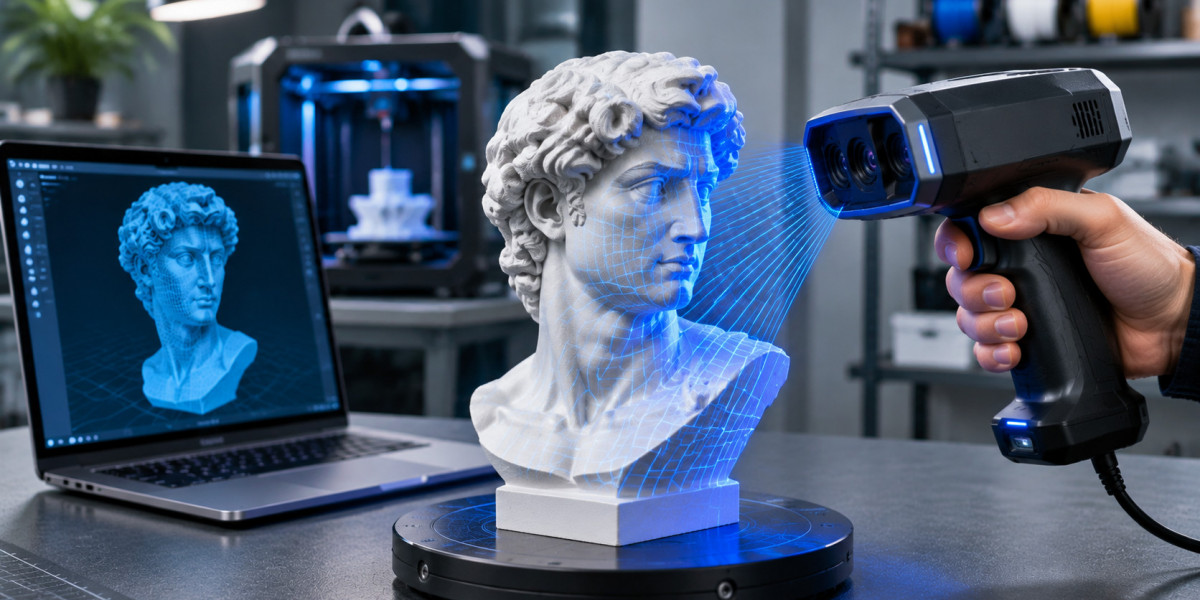

Combining 3D scanning with additive manufacturing makes it easier to recreate physical objects, customize existing products, and develop new designs. A scanner for 3d printer projects helps capture real-world geometry and convert it into digital models that can be modified and prepared for printing. Whether you are a DIY enthusiast, product designer, engineer, or small business owner, choosing compatible scanning equipment can improve your overall manufacturing workflow.
Why Combine a 3D Scanner with a 3D Printer?
A 3D printer creates physical objects from digital designs, while a scanner works in the opposite direction by capturing existing physical geometry.
Using both technologies creates opportunities for:
Reproducing discontinued plastic components.
Designing customized household accessories.
Developing replacement brackets and covers.
Creating prototypes from existing products.
Modifying physical objects for personalized applications.
Digitizing sculptures, collectibles, and decorative models.
For example, a designer can scan an existing plastic enclosure, import its geometry into CAD software, modify the dimensions, and print an updated version.
What Type of Scanner Works Best for 3D Printing?
Different scanning technologies are suitable for different projects.
Structured-Light Scanners: These devices project light patterns onto an object's surface and capture its geometry. They are useful for product digitization, decorative objects, and general-purpose scanning.
Blue-Laser Scanners: Blue-laser technology can capture detailed geometric features and is useful for mechanical components, engineering projects, and reverse engineering.
Infrared Scanners: Infrared scanning technologies offer convenient options for capturing different object geometries, depending on the device and scanning mode.
When selecting equipment, consider object dimensions, surface characteristics, required accuracy, and the level of detail needed for your printed models.
Important Features to Consider Before Buying
Choosing the right scanner involves more than comparing prices.
Scanning Accuracy: Important when reproducing components that need to fit existing assemblies or connect with other parts.
Resolution: Helps determine how much surface detail the scanner can capture. Higher resolution does not automatically mean higher dimensional accuracy.
Object Scanning Range: Make sure the device supports the sizes of objects you regularly work with.
Software Compatibility: Look for scanning software that supports point-cloud processing, mesh generation, and convenient file exports.
Portability: Handheld scanners can provide flexibility when capturing objects that cannot easily be moved.
Surface Compatibility: Reflective, transparent, and very dark surfaces may require additional preparation or specialized scanning modes.
How to Create a Printable Model from a Physical Object
A successful scan-to-print workflow involves several steps.
Object preparation: Clean the object and position it securely before scanning.
3D scanning: Capture the object from multiple angles while maintaining suitable scanning distance.
Data processing: Align scanning frames, remove unwanted points, and generate a polygon mesh.
Mesh editing: Repair holes, remove unnecessary geometry, and modify the model when required.
CAD reconstruction: Rebuild important mechanical features when precise dimensions or functional connections are necessary.
Slicing and printing: Export the model into a compatible format, prepare printing settings, and produce the physical part.
Common file formats include STL, OBJ, PLY, and 3MF. Compatibility depends on the scanning and modeling software being used.
Common Challenges When Using a 3D Scanner for Printing
Not every scanned object immediately becomes a printable model. Some surfaces may be missing because of limited visibility, difficult geometry, or unsuitable material characteristics.
Thin walls, deep openings, and narrow gaps may require additional modeling.
Functional replacement parts also need dimensional validation. A scanned mesh may look accurate but still require adjustments to mounting holes, clearances, and connection points.
Material selection matters too. The printed result must withstand the intended mechanical load, temperature, and environmental conditions.
Is a 3D Scanner a Worthwhile Investment?
For makers, hobbyists, and small businesses, combining scanning and 3D printing can reduce manual modeling work and support more flexible product development.
The right scanner depends on your typical object sizes, measurement requirements, scanning frequency, and software preferences.
Beginners can start with straightforward decorative objects before progressing to complex mechanical components and functional replacement parts.
Conclusion
A scanner and a 3D printer create a practical connection between physical objects and digital manufacturing. From customized accessories to prototype development and reverse engineering, this combination offers opportunities for both creative and engineering projects.
Before purchasing, compare scanning technologies, accuracy, object coverage, and software compatibility. Selecting equipment according to your actual requirements can help you build a more efficient and cost-effective scanning-to-printing workflow.