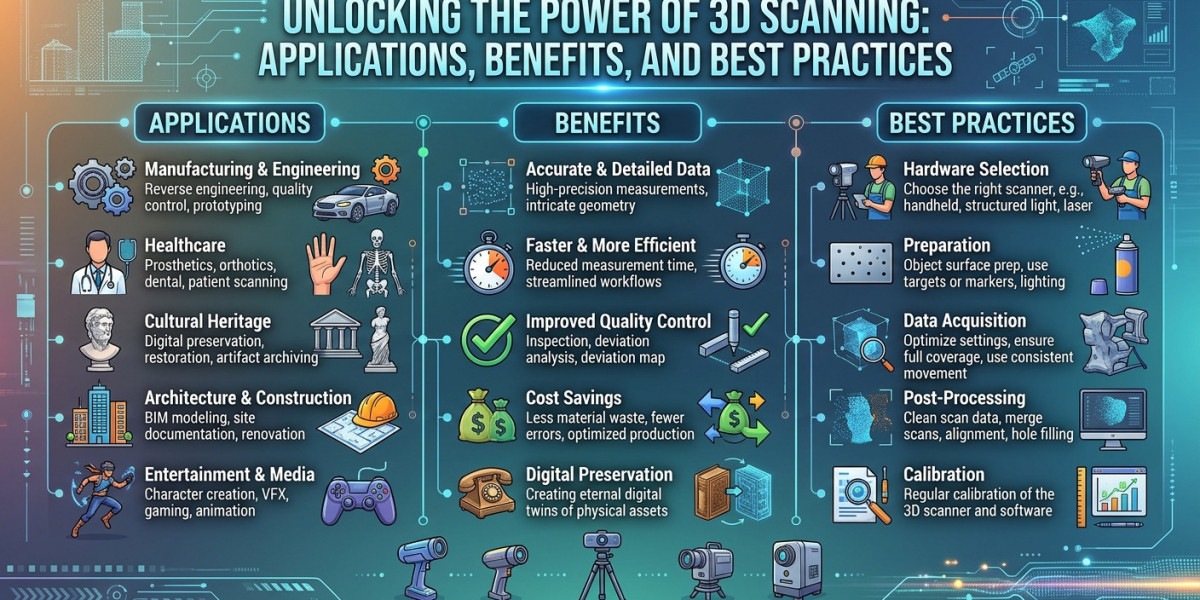

Transforming a physical object into a precise digital model once required expensive equipment, specialized laboratory setups, and hours of painstaking manual measurement. Today, modern 3D scanning technology has streamlined this process, enabling engineers, designers, artists, and educators to capture complex physical geometry with high accuracy in a matter of minutes.
Whether you are reproducing a rare automotive part, designing custom medical devices, or archiving historical artifacts, 3D scanning bridges the gap between physical reality and digital design. Understanding how this technology works, where it provides the most value, and how to choose the right tools can help you streamline workflows and unlock new creative possibilities.
What Is 3D Scanning and How Does It Work?
3D scanning is a non-contact, non-destructive technology that digitally captures the shape of a physical object using light, lasers, or sensors. The scanner projects light patterns or laser beams onto the target surface, measures how that light reflects back, and calculates millions of precise data points in three-dimensional space (X,Y, and Z coordinates).
Together, these points form a dense "point cloud." Dedicated software then processes this point cloud, connecting adjacent points to form a polygon mesh. The result is an exact 3D digital representation of the physical object that can be inspected, modified, or exported into Computer-Aided Design (CAD) software.
Primary Technologies Used in Modern Scanners
Structured Light Scanning: Projects a series of light patterns (often blue or white LED light) onto an object. Cameras observe the distortion in the pattern to calculate depth and shape. This method excels at capturing fine surface details and color textures quickly.
Laser Scanning: Uses laser lines or sweeps to measure distances. Laser-based systems are highly resistant to ambient lighting conditions and perform exceptionally well on shiny, dark, or reflective surfaces.
Photogrammetry: Reconstructs 3D models by analyzing overlapping photographs taken from multiple angles. While accessible, it typically requires controlled lighting and extensive computing power compared to dedicated optical scanners.
Key Applications Across Industries
The versatility of modern 3D scanning has made it an essential asset across diverse fields:
1. Reverse Engineering
When technical documentation or CAD models are missing—such as with legacy automotive components, antique machinery, or custom aftermarket modifications—3D scanning provides the fastest route to recreation. Engineers can scan the existing part, extract surface geometry, and generate a parametric CAD model ready for manufacturing.
2. Rapid Prototyping and 3D Printing
Integrating 3D scanning with 3D printing creates a seamless hardware workflow. Instead of building complex models from scratch in design software, creators can scan real-world items, scale or tweak the design, and send it directly to a 3D printer for fast prototyping.
3. Industrial Inspection and Quality Control
Manufacturing tolerances require absolute precision. By comparing a scanned physical part directly against its original CAD blueprint, quality assurance teams can generate heat maps that highlight microscopic deviations, surface wear, or manufacturing defects before parts reach production.
4. Healthcare and Prosthetics
In the medical field, 3D scanning enables fully customized patient care. Clinicians scan limb geometry, dental structures, or facial features to design perfectly fitted orthotics, prosthetics, and dental aligners without relying on uncomfortable plaster molds.
Choosing the Right 3D Scanning Solution
Selecting the right hardware depends on your specific applications, target object sizes, and budget constraints. High-end industrial scanners offer extreme precision but often come with steep price tags and steep learning curves. On the other hand, portable handheld scanners provide flexibility and speed for field work and rapid design iterations.
Innovators in the field, such as Revopoint 3D, focus on making professional-grade 3D scanning accessible to a wider global audience. By combining high optical precision with intuitive, lightweight designs, modern handheld units allow creators, small business owners, and engineering teams to achieve industrial-quality results without requiring complex lab setups.
When evaluating a device, consider the following parameters:
Single-Frame Accuracy: How closely the scanned points match the true physical dimensions.
Resolution: The smallest detail distance the scanner can capture on a surface.
Scanning Speed: Measured in frames per second (FPS), determining how quickly a full scan can be completed.
Working Distance and Capture Range: Dictates whether the device is optimized for small components (like jewelry or small gears) or large structures (like body panels or furniture).
Best Practices for Achieving High-Accuracy Scans
To achieve optimal results from your 3D scanning hardware, proper preparation and technique are essential:
Prepare Difficult Surfaces: Shiny, transparent, or deep black objects can disperse light beams. Applying a temporary, removable matte scanning spray creates an even, non-reflective coating that improves data capture.
Maintain Consistent Lighting: While modern laser and structured-light devices handle ambient light well, avoiding direct sunlight and harsh glares ensures cleaner data.
Use Tracking Markers: For featureless or symmetrical objects (like smooth spheres or flat plates), applying adhesive alignment markers provides reference points for the software to track position accurately.
Optimize Motion Control: Using an automated turntable for smaller objects ensures smooth 360 coverage and eliminates hand tremors during capture.
Conclusion
3D scanning technology has transformed from a niche industrial tool into an essential, mainstream driver of modern design, manufacturing, and creative industries. By turning physical objects into accurate, workable digital assets, it accelerates product development, eliminates costly design errors, and opens up infinite possibilities for customization. As hardware becomes more compact, affordable, and powerful, integrating 3D scanning into your workflow is one of the most effective ways to stay ahead in an increasingly digital world. What physical projects or design challenges in your current workflow could benefit most from high-precision digital capture?
Frequently Asked Questions (FAQs)
What is the difference between single-frame accuracy and volumetric accuracy in 3D scanning?
Single-frame accuracy refers to the measurement precision of a single capture frame taken by the scanner. Volumetric accuracy accounts for the cumulative error that can occur as multiple frames are aligned and stitched together over a larger surface area or longer distance.
Can a 3D scanner capture dark, transparent, or shiny surfaces?
Standard optical light scanners can struggle with reflective or transparent surfaces because light passes through or scatters unevenly. However, using a temporary, washable scanning spray coats the surface in a fine matte white powder, allowing optical scanners to capture exact geometry without damaging the object.
Is specialized CAD software required to use a 3D scanner?
Most 3D scanning systems include proprietary software to manage data capture, point cloud processing, and mesh generation (exporting formats like OBJ, STL, or PLY). If you plan to modify the design, perform reverse engineering, or run engineering simulations, you will typically import that mesh into CAD software like Fusion 360, SolidWorks, or Blender.
How does 3D scanning complement 3D printing workflows?
3D scanning acts as the input device for 3D printers. Instead of manually measuring complex shapes with calipers and building CAD models from scratch, you can scan an existing object, make necessary digital adjustments, and generate a printable file in a fraction of the time.