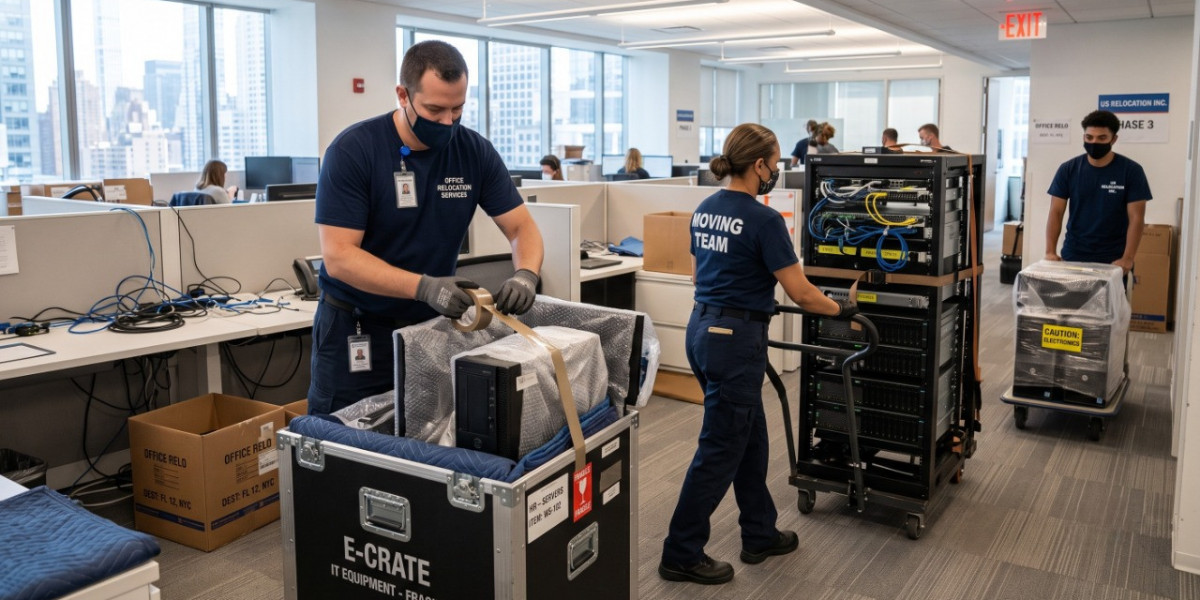

Relocating an office is far more complicated than moving a home. Businesses rely on computers, servers, office furniture, printers, confidential files, and specialized equipment that must arrive safely and be operational as quickly as possible. Every hour of downtime can affect productivity, customer service, and revenue.
This is why many organizations consider hiring a commercial moving company instead of trying to coordinate the move internally. Professional commercial movers have the experience, equipment, and planning strategies needed to relocate offices efficiently while minimizing business interruptions.
In this guide, we'll explain exactly how commercial moving companies handle office equipment, the relocation process, and how to choose the best moving professionals for your business.
Why Office Equipment Requires Special Handling
Unlike household furniture, office equipment often includes expensive electronics, sensitive data, and fragile components.
Examples include:
- Desktop computers
- Laptops
- Servers
- Network equipment
- Multi-function printers
- Conference room technology
- Medical equipment
- Manufacturing devices
- Filing cabinets
- Office desks
- Cubicles
- Ergonomic chairs
- Telephone systems
- Security equipment
Improper handling can lead to:
- Hardware damage
- Data loss
- Network downtime
- Delayed business operations
- Employee productivity issues
- Expensive replacements
Professional movers reduce these risks through careful planning and specialized moving techniques.
Step 1: Initial Office Moving Assessment
The first step commercial movers take is performing a complete assessment of the office.
During this visit, they typically evaluate:
- Office size
- Number of employees
- Quantity of equipment
- Furniture inventory
- Elevator access
- Parking availability
- Building restrictions
- Loading dock access
- Sensitive equipment
- Timeline requirements
This assessment allows the moving company to create a customized relocation plan.
Businesses benefit because every office has different needs.
Step 2: Creating a Detailed Moving Plan
Successful office relocations begin with detailed planning.
Commercial movers often prepare:
- Equipment inventory
- Room-by-room labeling
- Department assignments
- Moving schedules
- Employee packing instructions
- Technology relocation plans
- Furniture disassembly schedules
- Delivery timelines
The goal is reducing confusion during moving day.
Many commercial movers also coordinate directly with office managers, IT departments, and building management.
Step 3: Labeling Every Piece of Equipment
Proper labeling is one of the most important parts of an office move.
Each item typically receives:
- Department label
- Employee name
- Destination room
- Equipment number
- Floor assignment
- Priority level
This organized system ensures every item reaches the correct location.
For larger businesses with hundreds of employees, labeling prevents unnecessary delays.
Step 4: Protecting Computers and Electronics
Electronic equipment requires careful packing.
Professional movers generally use:
- Anti-static wrapping
- Foam inserts
- Bubble cushioning
- Heavy-duty moving boxes
- Custom crates
- Protective blankets
Before disconnecting computers, many companies recommend:
- Backing up important files
- Photographing cable connections
- Labeling power cords
- Labeling monitors
- Disconnecting accessories
- Securing external drives
This makes reconnecting systems much easier at the new office.
Step 5: Safe Handling of Servers and IT Infrastructure
Servers are among the most sensitive assets during an office relocation.
Commercial movers usually coordinate with the company's IT department to:
- Shut down servers properly
- Disconnect network equipment
- Label every cable
- Protect hard drives
- Pack networking devices
- Transport equipment securely
Some businesses even schedule server moves after working hours to minimize operational disruptions.
For companies with large data centers, specialized IT relocation services may also be used.
Step 6: Disassembling Office Furniture
Large office furniture cannot usually be moved as-is.
Professional movers carefully disassemble:
- Cubicles
- Conference tables
- Executive desks
- Shelving systems
- Reception counters
- Modular workstations
Each component is labeled to simplify reassembly.
Hardware like screws, bolts, and connectors are stored in clearly marked bags to prevent loss.
Step 7: Packing Office Furniture Properly
Furniture receives multiple layers of protection before transportation.
Commercial movers often use:
- Moving blankets
- Stretch wrap
- Corner protectors
- Foam padding
- Protective covers
This helps prevent:
- Scratches
- Dents
- Broken glass
- Damaged wood finishes
Proper protection is especially important for expensive executive furniture.
Step 8: Handling Confidential Documents Securely
Many businesses store sensitive records containing:
- Financial information
- Employee records
- Customer data
- Legal documents
- Medical information
Commercial movers follow organized procedures for transporting confidential files.
Common practices include:
- Locked file containers
- Numbered boxes
- Chain-of-custody tracking
- Restricted handling
- Secure transportation
Businesses should also identify highly confidential documents before moving day.
Step 9: Moving Heavy Equipment Safely
Some offices contain oversized equipment such as:
- Large printers
- Industrial machines
- Medical devices
- Commercial copiers
- Safes
Commercial movers use specialized equipment including:
- Appliance dollies
- Pallet jacks
- Hydraulic lifts
- Furniture dollies
- Lift gates
- Ramps
These tools reduce injury risks while protecting valuable equipment.
Step 10: Loading the Moving Truck Strategically
Loading isn't random.
Commercial movers create loading plans that prioritize:
- Weight distribution
- Fragile equipment
- Destination order
- Easy unloading
- Equipment stability
Heavy furniture is secured using straps.
Electronics are positioned carefully to avoid excessive movement during transportation.
Step 11: Safe Transportation
Transportation involves more than simply driving from one location to another.
Professional commercial movers monitor:
- Road conditions
- Weather
- Vehicle stability
- Delivery schedules
- Security
Many commercial moving trucks include:
- Air-ride suspension
- GPS tracking
- Climate considerations
- Secured cargo systems
These features help protect sensitive office equipment throughout transit.
Step 12: Unloading and Office Setup
Once the truck arrives, movers unload according to the relocation plan.
Equipment is delivered directly to:
- Individual offices
- Departments
- Meeting rooms
- Reception areas
- Break rooms
- Storage areas
Rather than leaving everything in one location, organized placement speeds up office setup.
Reassembling Office Furniture
Commercial movers usually reassemble furniture immediately after unloading.
This includes:
- Cubicles
- Desks
- Workstations
- Shelving
- Conference tables
Because every component was labeled during disassembly, installation is much faster.
Employees can often return to work sooner.
Coordinating With IT Teams
Although movers transport computers and servers, many businesses coordinate with internal or external IT professionals to reconnect systems.
This may include:
- Internet installation
- Network testing
- Phone system setup
- Printer configuration
- Security system installation
- Server testing
Working together helps businesses resume normal operations quickly.
Reducing Business Downtime
The biggest goal during commercial relocation is minimizing downtime.
Professional movers achieve this by:
- Moving after business hours
- Weekend relocations
- Department-by-department moves
- Organized scheduling
- Fast unloading
- Efficient furniture setup
Less downtime means employees can get back to work faster.
Insurance Protection During Office Moves
Professional commercial movers generally offer valuation coverage options for transported items, and many businesses also verify the mover's insurance before relocation.
Before hiring a commercial moving company, ask about:
- Liability coverage
- Equipment protection
- Claims process
- Additional valuation options
- High-value item procedures
Understanding your coverage helps reduce financial risk if unexpected damage occurs.
Common Mistakes Businesses Should Avoid
Office relocations often become stressful because of poor planning.
Avoid these common mistakes:
Waiting Too Long
Commercial movers often book weeks or months in advance.
Early planning gives businesses more scheduling options.
Forgetting to Label Equipment
Unlabeled equipment slows setup significantly.
Ignoring Employee Communication
Employees should know:
- Packing deadlines
- Desk preparation requirements
- Moving schedules
- New office assignments
Skipping Data Backups
Always back up important company data before disconnecting computers.
Choosing Movers Based Only on Price
The cheapest quote isn't always the best value.
Experience, licensing, customer reviews, and commercial moving expertise matter just as much.
How My Good Movers Helps Businesses Find Reliable Commercial Movers
Finding trustworthy movers can be time-consuming, especially when planning a business relocation.
That's where My Good Movers becomes valuable.
- Compare commercial moving companies
- Explore moving services across the United States
- Find movers based on location
- Read customer reviews
- Request multiple moving quotes
- Evaluate licensed moving professionals
- Save time during the research process
Instead of contacting dozens of moving companies individually, businesses can use My Good Movers to simplify the search and connect with movers that match their relocation needs.
Tips Before Hiring a Commercial Moving Company
Before selecting a mover, consider asking these questions:
- How much commercial moving experience do you have?
- Are your movers trained in office relocations?
- How do you protect electronics?
- Do you provide packing services?
- Can you move after business hours?
- Do you offer furniture installation?
- How is confidential equipment handled?
- What insurance options are available?
- Can you provide references from commercial clients?
- What is included in the written estimate?
These questions help businesses make informed decisions.
Conclusion
Office relocations involve much more than transporting desks and computers. Commercial moving companies use structured planning, specialized equipment, protective packing materials, organized labeling systems, and experienced crews to relocate businesses safely and efficiently.
From protecting sensitive electronics to coordinating with IT teams and minimizing downtime, every stage of the process is designed to keep operations running as smoothly as possible.
A well-planned commercial move protects your assets, reduces downtime, and helps your team get back to business with confidence.
Frequently Asked Questions (FAQs)
How do commercial moving companies protect office computers?
Commercial movers typically use anti-static materials, foam padding, protective blankets, sturdy boxes, and careful labeling to transport computers safely.
Should businesses back up their data before moving?
Yes. Always create secure backups before relocating computers, servers, or storage devices to reduce the risk of data loss.
Do commercial movers disconnect and reconnect computers?
Many movers disconnect and transport equipment, while reconnection is often handled by the company's IT staff or a specialized technology partner. Some moving companies also offer IT relocation services.
Why is hiring a commercial moving company better than handling the move internally?
Professional movers have the equipment, experience, and planning processes needed to move office assets safely, reduce downtime, and minimize the risk of damage.
What equipment can commercial movers relocate?
Commercial movers can transport office furniture, computers, servers, printers, filing cabinets, conference room equipment, safes, medical devices, and other specialized business equipment.
How does My Good Movers help businesses?
My Good Movers is a moving directory that helps businesses compare professional moving companies, read reviews, request quotes, and find experienced commercial movers throughout the United States.